Five Great TV Dramas To Watch This Summer

Here Emma D picks five of her favourite TV Dramas that she recommends you check out

Bittersweet Mondays: Weekly Webcomic

Confab presents the brand new Bittersweet Comics debut with the first of a weekly web-comic series.

Game Review: Serious Sam: The Second Encounter HD

Sam returns in a remake of the 2002 classic sequel, how does it stand up?

The Sexism of Horror Video Games

The history of sexism in video games is almost as old as games themselves, Emma D discusses the underlying sexism of the horror genre

Film Review: The Amazing Spider-Man

Spidey's latest outing hits the cinemas, does this reboot make a name for itself or is it just another cheap Hollywood cash-in?

Volunteer: A Career for the Unemployed

With high rates of unemployment across the globe, Charlotte explains why now is a great time for the jobless to volunteer!

Overrated: The Legend of Zelda Skyward Sword

Claimed by many critics as 'The Best Zelda Ever!'. Long time Zelda fan Emma D argues why it didn't live up to the hype.

Showing posts with label tech. Show all posts

Saturday, 28 July 2012

Game/Tech Review: Nintendo 3DS XL System

It's certainly bigger, but is it actually better?


Way back in March of 2011, when the 2012 Olympics were still far enough down the line that the horrendous logo wasn't plastered on everything under the sun, Nintendo released their next generation of handheld video game consoles, the Nintendo 3DS. Many eager gamers lined up for midnight launches across the country to get their hands on the new fancy 'glasses-less 3D' system. Despite the heavy anticipation and hype surrounding the system, the 3DS saw fairly lacklustre sales in its opening months, perhaps it was the wallet-devouring launch price of £220-£230, maybe it was the lack of must-have AAA game titles or it could have been the lack in significant aesthetics and name from Nintendo's previous DS handheld models, the Nintendo DS, DS Lite and DSi appearing to be just another revision rather than a fully new, more powerful system. Whatever the cause it prompted Nintendo to act quickly and slash the retail price of the 3DS to a far more acceptable £149.99 in stores, this new price cut and a handful of new must-have titles such as the Zelda: Ocarina of Time 3DS remake inflicted a huge and healthy spike in 3DS console sales.

Fast forward to now, the end of July 2012 and Nintendo have released a hardware revision of the 3DS, just 18 months after the 3DS launch. This revision, the 3DS XL's main selling point it commands is the 90% larger screens, 'the largest screens ever on a Nintendo handheld' the adverts boast. The top screen stretches 4.88 inches diagonally and the bottom touch screen at 4.18 inches. The original 3DS displays came in at 3.53" and 3.02" respectively.


Having played a few different games on the top screen, I've already begun to appreciate the larger, less reflective screen, 3DS games look great on it and the 3D works even better than before, with a larger 'viewing window' thanks to the screen size boost, this 'sweet spot' for the 3D is much more accessible. I often found myself holding the original 3DS closer than I would like to see more of the detail or get the best out of the 3D. Thankfully the 3DS XL can be played from a more comfortable distance without feeling the need to bring the system closer.
Up close however the 3DS XL does highlight the fairly low resolution (400x240 or 800x240 with 3D) of the top screen. If you look closely enough the pixels are far more visible to the human eye than they were on the 3DS. As Nintendo opted to keep the screen resolution the same some games can appear slightly more pixelated or 'jaggy' but I never found it to detract from my gameplay sessions, in fact, I found myself somewhat more immersed in games than I had been with the original 3DS.

Alongside the behemoth sized screens Nintendo has given the main body a slight makeover, gone are the fingerprint magnet glossy coats and instead, we're treated to a more premium and in my opinion, more attractive dual matte finish in black and either metallic Blue, Red or Silver. The stylus (which is now one solid body rather than the telescopic 3DS stylus) has been re-positioned to the right-hand side, in a move mirroring the DS to DS Lite stylus relocation, which is far more accessible during gameplay. Scrambling to find the stylus on the back of the original 3DS during gameplay was either hectic or game-pausing, the experience is far more seamless now.

The face buttons have seen some minor improvements, which now feel more clicky and as a result ever so slightly more responsive. The D-pad has received a minor size increase and due to the larger 3DS body, is far more practical to use in games, the original 3DS' size and shape made using the D-pad cumbersome and even cramp-inducing, so far I've had no complaints about using the D-pad on the 3DS XL. This brings me to the overall ergonomics of the unit, the console feels much sleeker and more comfortable to hold than its predecessor, which had protruding square edges and corners which I found didn't get on well with my gaming palms. This one fits far more elegantly into your hands and doesn't overstay it's welcome when playing for longer periods.


The lack of a second analogue slider pad is disappointing but I'd be lying if I said it was a deal-breaker, there are only a handful of games that make use of the Circle Pad Pro accessory for the 3DS, which I primarily used as a means of acquiring a more comfortable grip for my original 3DS. Nintendo announced a 3DS XL Circle Pad Pro would be released later in the year for those who refuse to play Metal Gear Solid 3, Resident Evil Revelations and the other couple of games without dual analogue action. Oddly the 3DS XL also lacks a power supply in the box, while this may benefit the size of the box and production costs it does leave new 3DS XL owners without a means to actually charge the system, Some retailers have bundled it with the system or it can be purchased separately for less than a tenner, the box subtly alerts consumers with small warnings as to the lack of a charger. One thing I felt the original 3DS did right was the inclusion of a plastic charging cradle users could effortlessly dump their console into charge when they were done gaming, without the need to fiddle around and plug in the power cable, sadly Nintendo has opted out of including a cradle for the 3DS XL in the box, although it is available for cradle lovers to purchase separately along with the missing charger for a questionable £20, I guess that's what Nintendo consider the price of conveniently charging your portable games system.

As well as all the aesthetic and ergonomic improvements Nintendo have also shoved in a larger battery for good measure, an inevitability really when those larger screens are going to need more precious energy. The battery life actually improves and last an hour to an hour and a half longer than the original 3DS on a full charge depending on brightness and wireless settings, a welcome upgrade considering the original 3DS' battery life wasn't great which goes against the grain for a Nintendo handheld.

Many of these improvements help fix many of the issues I had with the original 3DS and as a handheld, the 3DS XL feels far more suited for longer gameplay sessions. However, there are still a few areas the 3DS XL leaves me wondering why they didn't touch them up too. The cameras are as still shockingly bad as they were back on the DSi and original 3DS: grainy and low-quality, and I was disappointed the analogue slide pad isn't coated with a more grip-able texture though it's far from unusable. The sound levels coming from the unit's speakers were almost if not entirely identical to the original 3DS speakers, even at maximum volume it's not particularly loud and doesn't impress the ears. Of course, the use of headphones can alleviate this problem but I'm not one to wear headphones around the house which is, which is where I spend the majority of my 3DS gaming time, despite it being portable.


Perhaps it's all due to my issues with the original 3DS but when it comes down to it, I'd be hard-pressed to argue that 3DS XL's improvements aren't significant enough to recommend it over the original for first-time buyers looking to buy a Nintendo 3DS. The longer battery life and the more ergonomically satisfying form factor were enough for me to opt for an upgrade from my 3DS. The larger screen is definitely a bonus too, especially for the glasses-less 3D.  For others considering upgrading, I'd still recommend if like me, you find the original 3DS' comfort levels just aren't adequate enough for something designed to frequently fit in your hands for various periods. If you're still happy enough with your original 3DS and don't have the cash to spare then stick with it. A substantial influence on my decision to upgrade was a local retailer's surprisingly generous trade-in value for the original 3DS when put against the new 3DS XL. The lack of including a power adaptor is a confusing move by Nintendo but a problem that can be easily and cheaply solved. Those looking for more power and higher-end graphics closer to the likes seen on home consoles may be better suited to Sony's marginally more expensive offering, the PS Vita.


Product: 3DS XL
Manufacturer: Nintendo Co. Ltd
Release Date: 28/7/2012 (Europe/Japan) 19/8/2012 (North America/Australia)
Retail price: £179.99 (UK) $199 (USA)
Colours Available: Red+Black/Blue+Black/Silver+Black (Europe/Japan only)

The Good:
+ Playing games on the new larger screen looks and feels great
+ Less glare/reflection on the top screen
+ Glasses less 3D simply looks and works better thanks to the larger screen
+ Improved battery life
+ Nicer Dpad and face buttons and proper start/select/home buttons
+ The units sleeker and more rounded edges make it more comfortable to hold for prolonged gameplay sessions
+ Stylus now far more accessible during gameplay
+ Fewer fingerprints thanks to the matte finish


The Bad:
- Heavier and less portable
- Still the same low screen resolutions
- Some games can look slightly worse on the larger screens
- Lack of a second analogue slider pad feels like a missed opportunity
- No charger in the box
- No significant improvements to the mediocre speakers
- Incompatible with many 3DS accessories (including circle pad pro)

Saturday, 7 July 2012

Tech News: The Furbies Return... Wait, sorry what?!


Remember these guys? The overly popular, little furry robots of the late 90s are set for an Autumn/Fall 2012 return, Hasbro announced earlier today.

The original line, released in the 1998-2001 period, saw over 40 million units sold before kids interest quickly darted to the next phase at the time. The new 2012 reboot isn't hugely different to the original although one of the main new features is twin brightly-lit LED eye screens with mechanical eyelids animate with a variety of different expressions and even quirky pictures.


Hasbro has also revealed that there will be a companion app released for iOS devices, which will allow users to control their Furbies via different on-screen commands. The app itself works by playing different soundbites that the Furbies are programmed to respond to.


Furby's  artificial intelligence have also received a boost resulting in different personalities and characteristics as well as the ability to interact with other nearby Furbies:

The new Furby has a series of nested personalities than can be unlocked over time. Within minutes of using mine, its eyes started blinking, and it transformed into a "valley girl" type of character. Furbies respond to being shaken or turned, and will dance to music. Honestly, it's as unpredictable as a little kid. - CNET 


 The new breed of updated Furbies will retail this Autumn for $60 Stateside, there is currently no word on a UK retail price or release date.


- Ben Carron

Wednesday, 4 July 2012

Feature: Five reasons why I love Twitter

You are what you Tweet


Twitter (for the few of you who have somehow managed to completely avoid it) is a social networking, micro-blogging site which launched in 2006. It has since become a driving force in making the worlds of television and celebrity culture interactive experiences for the everyday man. Thanks to Twitter, television viewers can engage in live chats about what they are watching with other viewers through the use of the hashtag, or send messages to celebrities who use the service, many of whom will write them back. I have been using the site since 2009 and now the biggest factor in my often more than daily tweets is the smartphone. Since downloading the official Twitter app my time spent reading and posting tweets has soared. There are many many reasons I love Twitter but I've chosen five:


5. Twitter is a great way to share new music or other media and for artists and writers to promote their new work. It was through Twitter I discovered Jane Espenson's (a writer for Buffy the Vampire Slayer) hilarious web series 'Husbands' and Emma Caulfield's (Buffy actress) blog and web series.  It is a great tool for bands and comedians as they can post gigs and links for tickets quickly and easily which all of their followers then have access to. Through 'retweeting' you can share these with your followers or send them directly to people who may be interested.

4. Twitter is a quick and efficient way to hear breaking news. Through the 'trending topics' feature. Everyone who uses Twitter is able to see the most talked about subjects of the day. You can quickly view all the most recent and 'top' tweets on the topic. Some of these topics aren't very interesting, in fact usually on a daily basis fans of Justin Bieber or Lady Gaga have all tweeted something like 'Justin is our Boyfriend' or 'Gaga is Queen of Pop'. However, in cases of big news like natural disasters or elections, Twitter can be the quickest way to hear about it.


3. Twitter allows me to rant as much as I like. As there is a 140 character limit to each tweet it is easy to post a quick remark without giving it much thought. It is equally as easy to post a stream of tweets about how annoying a loud group of schoolgirls are on the bus you just got on to. Anything more than one status a day can be thought of as excessive on Facebook, whereas on Twitter, you are welcome to post as much as you like without anyone giving the volume of your tweets a second thought.

2. Twitter allows me to see what my favourite television actors are getting up to. Now when I say television, I'm probably being too general. It's mainly the cast of Firefly and Buffy that I'm interested in. It really places you at the frontline for news of the people you follow. This probably sounds more creepy than it actually is, but it's nice to see tweets from the likes of Simon Pegg with attached pictures of him and the cast of the newest Star Trek movie, chilling out at a bar after work.  

1. Twitter is a great way to keep entertained while killing time. Now that I have Twitter on my phone, it is my first port of call when I am waiting for a bus or on the bike at the gym, trying to take my mind off moving my legs. I follow BBC news which often links to full articles on their site which offers further time killing material in between comedians' jokes and actors' cute pet pictures. As soon as I get bored I automatically look to my phone to find out what everyone is up to and that the world hasn't ended while I was playing Dead Rising. Most importantly, it is the place I will hear first if Justin Bieber were to be fatally injured in a tragic hairspray accident.

- Emma-Lee Davidson

Tuesday, 3 July 2012

App Review: Splashtop 2 Remote Desktop

Control your PC from your phone or iPad


App: Splashtop 2 Remote Desktop
Category: Computing
Platform: iOS, Android
Price at time of Review: £1.49/$1.99 iOS- £3.13/$4.99 Android
Size: 20.2 MB iOS/2.87MB Android


Splashtop 2 is a virtual network computing app that allows you to view and control your Mac or Windows computer from your portable device through the internet. There is no shortage of VNC apps on the iOS App Store or Android market but Splashtop 2 is one of the fastest and best remote computing apps available and currently has over 7 million users worldwide.

Features:
* Access all your programs and files with 100% compatibility, including PowerPoint, Keynote, Word, Excel, Outlook, Quicken, IE, Firefox, Safari, and other PC / Mac applications.

* Watch all kinds of videos, including Flash videos (Hulu, AOL Video, Yahoo Video, etc.), DVDs, Media Player, that are only playable on your computer.

* Listen to music in any format on your computer (WMV, Real, WMA, MP3, AAC, etc.)

* Play 3D games (like World of Warcraft, StarCraft, Skyrim and Diablo III) or all the Flash games (like FarmVille, CityVille, Pet Society, Café World, FrontierVille)

* Enjoy the most vibrant experience with Apple Retina display support (when using native resolution)

And with the in-app purchase of Anywhere Access Pack, you can also:

* Connect to your PC or Mac seamlessly from anywhere, including over 3G/4G

* Browse all your content securely across the Internet with the same encryption algorithms and technologies as the biggest banks in the world.

* Establish the fastest and most responsive remote connection with enhanced reliability and self-optimizing network capabilities.


Splashtop 2 is an incredibly easy to use app with an intuitive user-friendly interface. To use it users just have to download the desktop client streamer for free from their website and set up a user account. Finding computers on the same Wifi network is automatic once you are logged in. Accessing your computer from a different internet connection than your home one is not any more difficult either. The requirement to log in with your user account or an IP address and security code will prevent unauthorised access to your computer from other users.


If you're the one family or friends go to when their PC has a problem, one great use of such VNC apps is that you can install them on a family or friend's computer and help them out with problems (if it's not too severe) without needing to leave your home.


As well as using it to view and access your computer remotely, Splashtop 2 allows users to turn their portable device's touchscreen into a track-pad to control the mouse on their computer, which can be handy for those who use their computers as a media centre in their living room.


It also allows you to stream audio through your portable device's speaker (or headphones if you wish) which essentially grants you the ability to stream all of your music and video collection straight to your device. The app streams video smoothly enough to be comfortable to watch and even has an option that will make the stream favour smoothness over sharpness for video playback.


For £1.49 (current sale price) it's an absolute bargain to be able to access and stream content from your computer to your tablet or phone. Splashtop 2 is miles better than most if not all other rival VNC apps on the market and also one of the cheapest. Nothing else I've tried even comes close to the near lawless streaming Splashtop 2 offers. It honestly feels like something out of a Sci-Fi film... 


Forget to turn off or lock your computer, or transfer an ever so important document after you've left the building? Splashtop 2 has you covered.


- Ben Carron

Monday, 25 June 2012

News: Facebook adds 'Local Friend Finder' service.

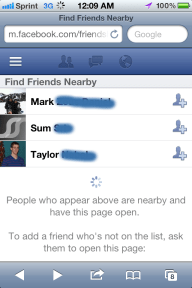
Facebook Local Friend Finder 

Social network giant, Facebook, have quietly introduced a new friend finding service for Facebook mobile. 


Simply dubbed 'Friendshake' the new service allows Facebook users to 'find friends nearby' using their smartphone's internet and GPS connections. 


(image from TCtechcrunch.com)

With this new service making it easier than ever before to find new acquaintances at festivals, concerts and other public events, now is the perfect time for facebook users to check over their accounts privacy settings.

- Ben Carron

Saturday, 25 February 2012

Tech Review: Plantronics BackBeat 903+ Stereo Bluetooth Headphones

Tech Review - Wireless Stereo Headphones

Product: Plantronics BackBeat 903+
Stereo Bluetooth Headphones
RRP: £69.99/$99.99
Current Price: £45.99/$59.99
Release Date: 12 Oct 2010


I realise that this review is about two years late, but if your reading this I'm sure that you realise that that amount of time does not affect the abilities of this product. This product happens to have aged quite well. Bluetooth is still used widely in a plethora of devices such as mobile phones, tablets and laptop computers.

Going by what I've experienced over the last few days, these Bluetooth headphones have been quite convenient for me so far; they seem like they will last me a while (seeing as all my other headsets break at the base of the wiring.) But on to what you came for, the review.

Music Sound Quality:
They provide very high quality audio, the treble is very crisp. There are other brands with crisper and sharper treble but normally at a higher price. However the highlight for me was the bass on these headphones: it is at the perfect level. That is to say that it is there, but it is not overpowered (Which I find with most headphones now) and allows me to fully appreciate the music as a whole.

As for noise cancelling, for a pair of non-noise cancelling dedicated headphones, which by the way are not in ear either, they provide quite a good level of noise cancellation. I mean obviously it's not exactly going to isolate you from everything around you, but it will cut out most of background noise, and the everyday shuffling and ruffling of everyday activities, provided you're listening with the volume above medium.

Call quality:
Although not as good quality as when used for music they are still quite good for calls, they do cancel out most background noise, however when calling I did seem to get lots of background noise through my mic, however I think this may just be an error with my headset, as many others say that the sending quality is excellent. Or it could be an environmental problem such as wind or loud surroundings.

Comfort, Controls and Functionality:
I have to say first, that if this is your fist pair of around ear headphones, they may be uncomfortable at first but after a while you will find a comfortable position to have them. Some people find in-ear headphones uncomfortable and may prefer to get these kind of headphones, the major advantage to around-ear headphones is that they don't tend to fall out easily like in-ear ear buds. 

The controls are very conveniently placed and are very easy to use. They can potentially end up being a hassle when adjusting the height and angle of the headphones, since when adjusting you may tend to accidentally hit a couple of them. However the overall functionality was excellent. They were extremely easy to set up (charge, turn on, scan for them, connect) and have not failed me since. The battery life is excellent lasting 7 hours straight (so far) on a single charge and still running strongly.

The overall feel of these headphones proves to be quite comfortable, the headsets stay quite firmly on my ears, and the wire round the back rarely bothers me, however the ear buds themselves are quite a bother, as I have never used this type of ear buds before I think it may be due to my lack of adjustment to them. However they feel very large, and out of place, and trying to find a comfortable spot for them to rest at first seems nigh on impossible to me. Even with this factor, after more adjustment they seem to get comfier every day so it might just be a matter of getting used to them.

The main feature of this device is of course: the Bluetooth connection. This by far is the most convenient part of the device, being able to walk around with no worry of being held down by your cable or accidentally tugging the cable too hard and breaking it or knocking your device out of your pocket. This feature removes all that hassle, which I thoroughly appreciate as all of my previous headphones have broken at the cable end of things not to mention the constant tangling of headphones in your pocket. Particularly useful for people who like to listen to music while participating in heavy exercise as they are more likely to stay put than traditional in-ear headphones.


However even if this is the highlight of the device, it too experiences some problems. Some of the potential problems include: the connection can be lost; sometimes the song doesn't stream quick enough and is jumpy; and there can be a significant delay in changing song and the next song actually playing. But honestly a little lag is to be expected from a wireless device. After all data can always move faster on a wired connection. Considering the problems I've had in the past with wired connections, I will definitely stick with these though.

Another thing about these headphones is that the style is a bit unusual. I mean nobody really wants to look like they are using a 1960’s hearing aid, but once you get past that initial feeling it's fine, anyone who mocks you is probably just jealous their headphones aren't wireless.


By The Numbers -

Music: 8/10
Calls: 7/10
Features/Design: 7/10
Comfort: 6/10
Ease of Use: 8/10
Overall Rating: 7/10

Verdict:
Although they are not the best of the best headphones, I still say these are worth a shot, if you are a fan of over-ear headphones already, or are able to get used to the style of non in-ear-buds. They are by no means poor quality or bad value for money. These headphones are very good quality for their price bracket, especially for: the Bluetooth, the sound quality and the ease of use. I believe that these are one of the highest quality Bluetooth headphones you will probably find for under £50 (At their current sale price), and for that reason I would recommend them to anyone looking to ditch the tether to their portable device or home computer.


- Alasdair Kerr

Music/Tech Review: Spotify

Spotify - Music in the clouds


Spotify is an online music streaming service in Europe and North America that allows users to stream music from thousands of artists to their computers or phones/tablets instead of having to download all the songs to their memory. 

It is very handy for music lovers who are running low on space on their hard-drives and/or phone memory. Spotify's development began in 2006 and it was released to public access in Europe, in October 2008. Free accounts were originally invite only to manage new user growth. Since then Spotify has also launched in the US and has over 10 million users. 2.5 million of those users are paid subscribers.

Accounts

Once you've downloaded the client for your device, you can either use a free account which is ad supported and has certain limitations, or you can sign up for an unlimited or premium account which have extra features and benefits for a monthly fee. Then you can get to listening to your music right away.

To use Spotify on a mobile device you'll need a premium account

A free account would suffice for non-heavy music listeners but for those who listen to music for several hours a day the unlimited and premium account may be worth the fee. For the price of buying one album per month, you get the option to listen at a higher bit-rate, to use Spotify offline by downloading the tracks to your hard drive and the ability to use it on mobile devices. 

I have the been a subscriber to the premium service since May 2010 and find it an absolute joy to use, whether I'm blasting some Daft Punk through my speakers at home or listening to various montage-like songs at the gym with my smartphone. 
Being able to 'queue' songs is a fantastic feature every music player should have. 

Mobile phone users should watch that using Spotify doesn't cut into their monthly Internet allowances, making playlists available for offline use while connected to a WiFi network can help negate using too much data while using Spotify on the go.

Music Catalogue & Playlists

Spotify adds thousands of new tracks daily to their millions and millions of existing tracks by thousands of different artists across the globe. Adding songs to your overall library is as simple as starring any song with a single click.

Sometimes people critique Spotify for not having certain high profile artists such as The Beatles, Metallica or Pink Floyd. While it can be a shame you may occasionally find one of your favourite artists absent, it's not something you should let discourage you from using Spotify, and here's why: All Spotify accounts allow users to listen to their own local music files on their computer as well as the various songs you're steaming in your playlists. So if you really want to listen to a song that Spotify doesn't have (rare, but it happens) then just download it elsewhere and tell Spotify which folder to look in and it does the rest. Simple.

Finding the right tracks couldn't be easier, the search bar in the corner lets users search by: song title, artist, album or playlists.


The ability to create playlists on the fly and add songs to one or more playlists and star your favourite tracks results in a incredibly useful music organising and sharing tool. Any playlist can be shared with others via Facebook or even just a link. You can also make collaborative playlists that allow multiple users to create and edit funky playlists. For premium users you can also check 'Make Available Offline' and Spotify will download all the tracks in that playlist to your device for use should you ever find yourself without an Internet connection. It's all incredibly easy to do, with most of these features being only a couple clicks away.

Social

One of Spotify's biggest advantages is the social integration. As of September 2011 new accounts are required to link to a facebook account. Some might see this as an unnecessary push for those just looking for a music app that don't want to bother with facebook, but how many people out there that would be tech savvy enough get Spotify wouldn't have a facebook account? Most people have one even if they don't use it anymore, and you could quickly make a new account should you not have one when you sign up for Spotify.

Sorry Twitter looks like you've been friendzoned.

The social integration is fantastic though, you can share playlists directly with your facebook friends and see what they've been listening to and what playlists they've subscribed to. If you don't want people to know you've been listening to the likes of Abba or Justin Beiber you can set Spotify to 'private session'. You can also set which playlists you want set public too should you have any embarrassing cheesy 80's playlists kicking about you don't want your buddies to see. 

Another social feature is that you can share any track, album or artist on facebook or twitter or send it to one of your friend's Spotify inbox. So if you've just heard a great new song and want to recommend it, Spotify allows you to do so, seamlessly.

Apps

In 2011 Spotify launched it's own Apps centre which allows users to install apps for all sorts of music related apps. There are all sorts of interesting and wonderful apps waiting for you on Spotify. Many apps just aim to help you explore and experience new songs and bands. Others expand on playlist building and sharing such as the 'Top10' app that lets you make different Top 10 lists of songs and share them with your friends. Other apps have totally different functions and can be really useful like 'TuneWiki' which has synced lyrics for your karaoke enthusiasts out there. 

At the moment there's only around 15 Apps available, though Spotify have said  more are set to release throughout 2012. The apps that are available do contain some interesting ideas. 'MoodAgent' finds playlists containing tracks to match the users mood. Built into Spotify is the Top Tracks and Lists which let users see the current Single and Album charts on Spotify, handy should you be interested in what's popular at the moment. Spotify also handily tracks your music habits and compiles a list of your top listened to artists and songs. You can also see your friends top artists/songs too which can be neat.

The apps are an entirely optional feature on Spotify to enhance your music and listening experience. Best of all they're all free. 

Radio

Unlimited and Premium subscribers can also listen to Spotify in radio mode, which is 'A gold mine for discovering new artists.' This is a dedicated radio stream to find and play tracks similar to songs by any of Spotify's artists.

Just click on your favourite artist and it'll automatically pull up and play songs deemed to be similar to that artist as well as tracks by said artist. I've already discovered some great new artists thanks to Spotify Radio.

Sadly it doesn't include actual radio stations, hopefully Spotify will integrate radio support in the future. Although it would be a country by country basis and as such would be both very time consuming and potentially costly.


Spotify's Radio Mode on the Desktop client


Alternative Services


There are alternatives out there such as Grooveshark, Rdio and Rhapsody.
Grooveshark is the only one I've tried thoroughly myself, you get more for free than you do with Spotify and it runs in your browser instead of as a programme. It's music library is the main difference though, it's powered by user uploads so while it does allow them to get many different artists, including ones not on Spotify, it does leave the library prone to duplicates and poor quality uploads and user-errors like spelling/name mistakes. Unlike Spotify, Grooveshark is not completely licensed which means artists may not benefit at all from appearing on Grooveshark. Also please note this does not make Grooveshark an illegal music service.


'There is a distinction between legal and licensed. Laws come from Congress. Licenses come from businesses. Grooveshark is completely legal because we comply with the laws passed by Congress, but we are not licensed by every label (yet). '
- Paul Geller, Grooveshark’s Sr. VP of External Affairs, in an open letter to the music industry regarding Grooveshark’s legality.

Each music service has it's own advantages and disadvantages but from the ones I've seen, experienced and read about; Spotify offers the best features, look and seamless functionality to me.


Verdict 


Spotify isn't for everyone. It's not particularly worth it for people who rarely listen to music and it's definitely not for those who are very rarely or never with an Internet connection. Spotify is an online service and can not be properly utilised if you don't have regular access to the Internet. 


But for those with frequent access to the Internet, Spotify can be a wonderful music player and tool; especially for those willing to cough up £5/£10 for the unlimited or premium subscriptions. It's a well designed, fast and functional client that can enhance the user's music experience. It covers it's bases for audiophiles by allowing higher bit-rates (paid subscription only) and use of local music files on your computer or device. It feels like they've thought of everything and the music catalogue which contains over 15 million tracks is just incredible. Spotify have done away with needing gigabytes upon gigabytes of storage to store huge music libraries and the social integration has the potential to open up anyone's music tastes and enjoyment of sharing different songs with friends without having to keep a hundred different youtube or last.fm tabs open in your internet browser. 


You don't have to take my word for it, why not download and try out Spotify for Windows/Mac for free: here


- Ben Carron

Twitter Delicious Facebook Digg Stumbleupon Favorites More
KingViral
See my work in Kettle Mag